


SoundCloud Go+ is an exceptional product that allows its users unlimited access to millions of music and audio files on demand. It is the premium offering of the universally recognized SoundCloud brand. This platform offers high-end music content produced by very passionate creators. Its first prestige is that it offers ad-free listening to limit annoying interruptions and it offers completely free downloads for offline listening. Comparable to the music version of Youtube, it is now available in nearly 200 countries and already has more than 30 million artists offering over 300 million songs to listen to online or offline. In this article, we’ll tell you how to share your SoundCloud Go+ subscription, but first we’ll discuss its various features.
What can I do on SoundCloud Go+?
With SoundCloud Go+, you have all the main features of the brand. You can become :
Creator: Record your songs, then quickly upload them to SoundCloud. Share your songs with friends or other users in a public or private way. The platform provides you with analytical and measurement tools to accurately assess the success of your audio creations.
Listener: Sign up and enjoy new music every day. The SoundCloud algorithm will provide you with ideal recommendations based on what you hear. You can save songs and playlists with a like, as well as comment on your favorite songs.
Web Leader : Do you like the notion of influencer? You have a great alternative! Create playlist content for your subscribers and share your passion for music with them.
Can I get SoundCloud Go+ for free?
Listening to the millions of songs available on SoundCloud is completely free, whether you have a SoundCloud account or not. However, the paid version of SoundCloud for listeners is supported by advertising and broadcasting in mp3 format in 128 kbps quality. If you don’t want the ads to interfere with your listening, you’ll have to opt for a paid subscription, namely SoundCloud Go + and then enjoy all the benefits of SoundCloud.
How much does SoundCloud Go+ cost?
The general platform offers publishers two paid subscription options:

For each subscription, free trials are offered. And as a bonus, students get a 50% discount on SoundCloud Go+.
What are the advantages and disadvantages of SoundCloud Go+?
For creators, SoundCloud Go+ allows you to expand your music project by increasing your communication opportunities. It is recommended to you within your social networks in order to boost considerably the visibility of your musical creations. This platform guarantees the promotion of your titles to a varied audience and a smooth distribution. Although this platform has no real flaws, we can still point out the fact that some titles are only available by subscription. We can also mention the fact that the application does not allow access to the original version of the music.
Can more than one person use SoundCloud Go+ on the same subscription?
Good news for everyone, in addition to using the app on your desktop, you can share your SoundCloud+ Go subscription on up to three other devices at once. To do this, you must share access to your account by communicating the email address used during registration and the password to your guests.
How to share your SoundCloud Go+ account?
Sharing your SoundCloud account is very simple, you just need to send your friends the profile URL of your account.
Time needed: 4 minutes
Share your SoundCloud Go+ account?
-
You connect to the application and then go to your profile
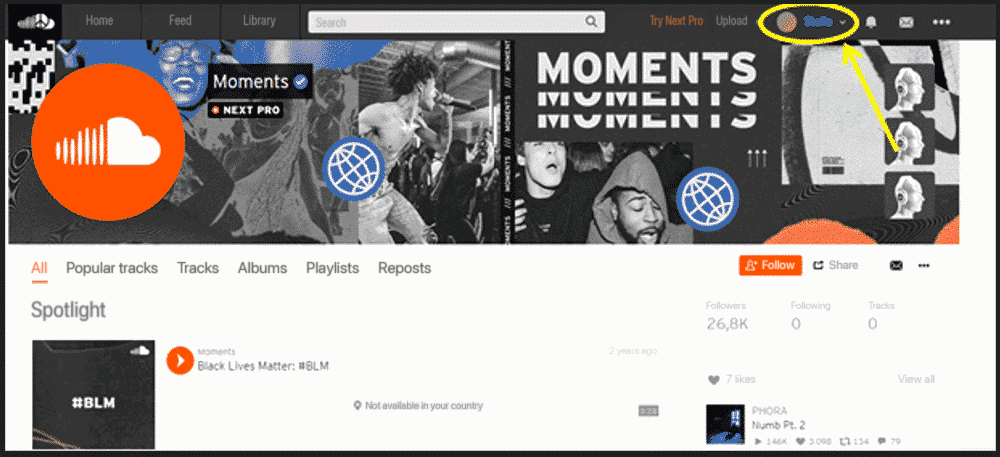
-
You select the “Profile” section: If you click directly on “share” at the bottom, you will be redirected to the payment page of the chosen plan.
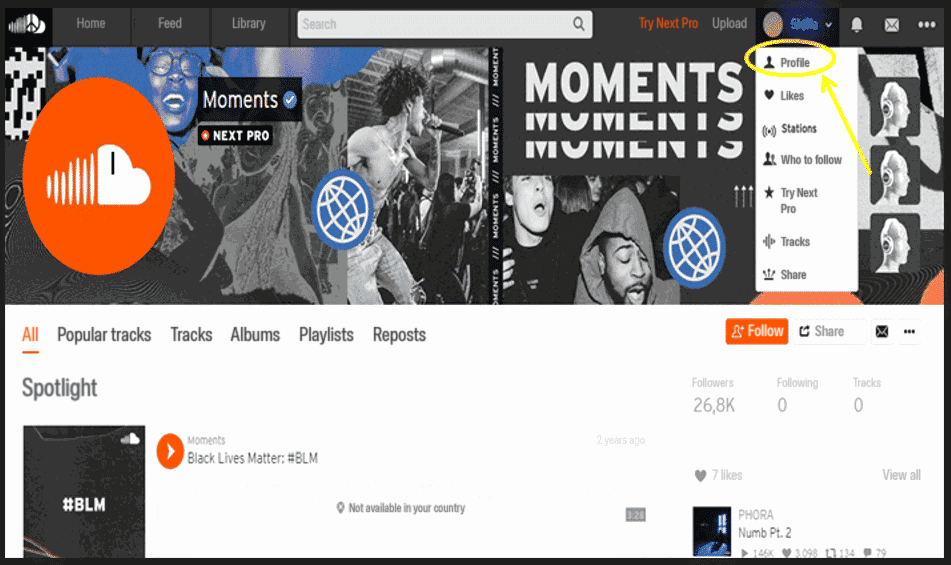
-
Then you click on “share”:
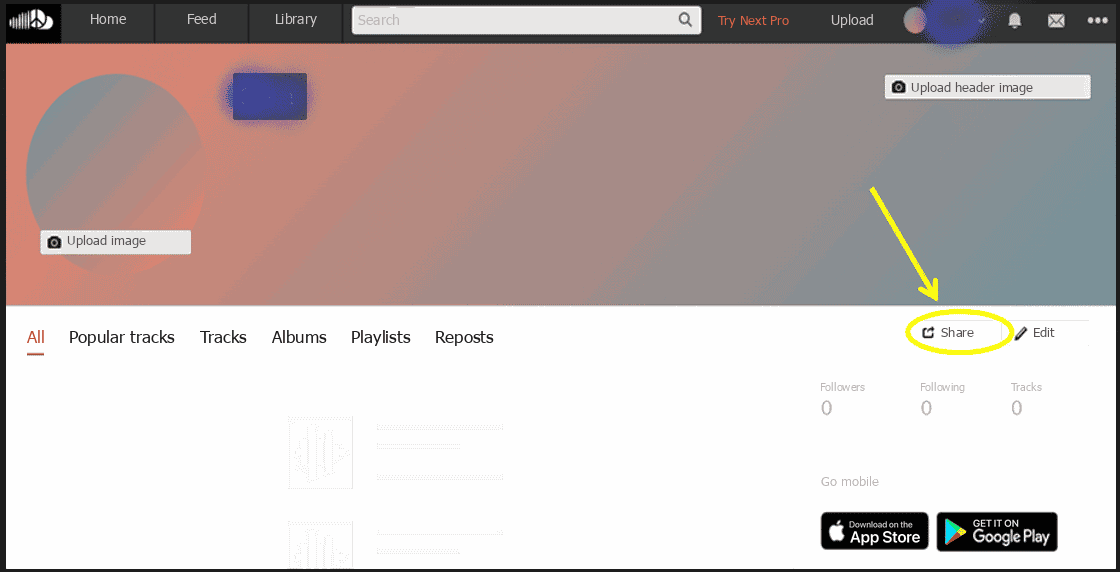
-
An icon will appear with the URL of your account. All you have to do is share it in your social networks:
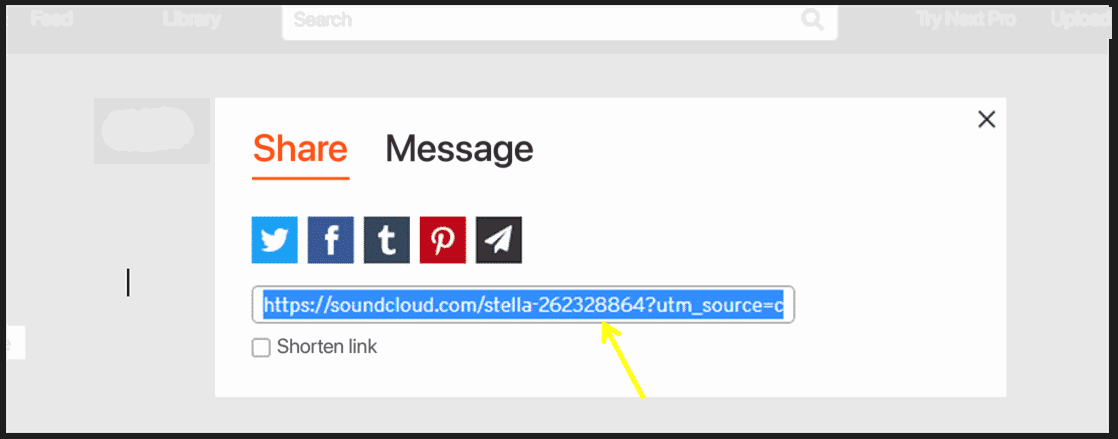
What are the risks of sharing your SoundCloud subscription?
If you want to share your SoundCloud Go+ subscription with another person or group of people. They will be able to see your activities, information and navigate your account. In fact, each of them has the same leeway as you on this account and therefore there can be a claim of ownership of the account by each of them. Intervention in such a case is very difficult, as SoundCloud’s policy states that the person who holds the registration email owns the associated SoundCloud account and all the data attached to it. To prevent this kind of disagreement, it is recommended to do this sharing through a password manager and not send it in plain text.
Want a low-cost SoundCloud subscription?
Sharesub is a service designed to let you share the unused spots in your subscriptions and get paid for them. On the platform you can easily find a group to join, or subscribers for your own account, so you can cut your costs in a secure environment. With SoundCloud Go+, the two spots available besides your own let you recover part of what you pay every month. The credentials you provide are encrypted and can be edited in your account. Then simply send your invitation link to your friends and family and earn money safely.