


How to share your Antidote subscription?
With the rise of the Internet, words are flashing before our eyes. To explain the concepts of a product or to promote the services of a company, contents are published regularly. However, in order for them to have the desired effect, the quality of the language used (French, English, and many others) has to be right. With Antidote, success is guaranteed! Did you know that if you have an Antidote subscription, you can share it?
What is Antidote?
Antidote is the ultimate grammar checker. It is known throughout the world and its reputation precedes it. It is also a proven writing aid for English and French. The tool combines ten dictionaries, an inspection prism, a proofreader, ten language guides, a revision prism and other tools.
Its advantages and disadvantages
Speaking good English is not enough: you also need to write flawless English. That’s where Antidote comes in. The biggest advantages of this tool are its power and versatility. It is more effective than the standard checkers in Word, Thunderbird or Chrome. It can also handle variations in language and colloquial expressions. As for its weaknesses, some people find a few of its corrections a little far-fetched.
Subscription packages available for Antidote
Druide offers four different Antidote plans, depending on the number of users and languages (Druide’s online store lists its prices in euros):
– Antidote + personal for one account:
- €59 a year for the single-language version (English or French);
- €89 a year for the bilingual personal version (English and French);
– Antidote + Family for five accounts:
- €99 a year for the single-language version;
- €149 a year for the bilingual version.
How do I add a guest user?
The responsible user is the person managing the subscription. The guest user is the person who is invited to join the subscription. If she doesn’t have an account yet, an email address is required to create one. The supervised user is the one who does not require an email address. It is intended for children under 16 years old.
Antidote and the family plan
The responsible user manages users to share Antidote. The Antidote+Family subscription is accessible from the “Subscriptions” tab. You can then choose Antidote+. The “Users” field is located at the bottom of the page.
How to share Antidote with a guest user?
Time needed: 3 minutes
Here are the steps to follow
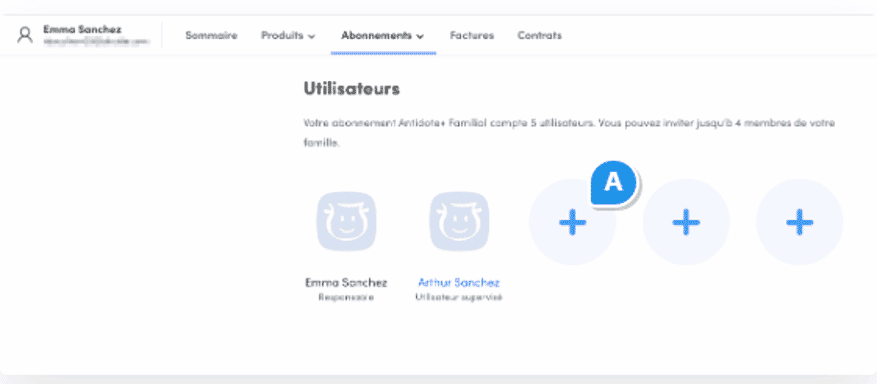
- Go to your subscriptions
Click on a circle with a + (A).
- Invite your subscriber
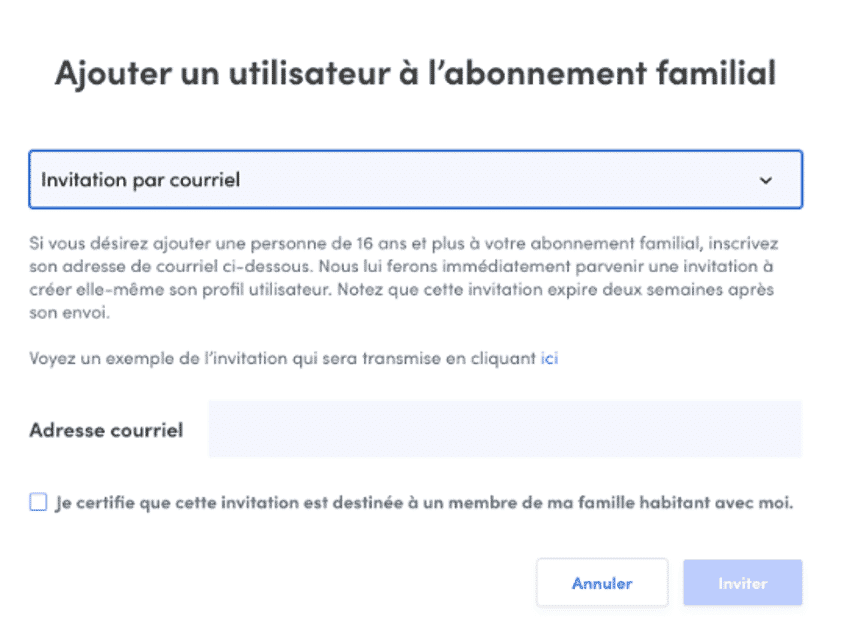
Opt for the “Invitation” by mail via the drop-down menu.
- Receive your subscription invitation
Enter the address of the person to be invited and click on “Invite”.
- Take advantage
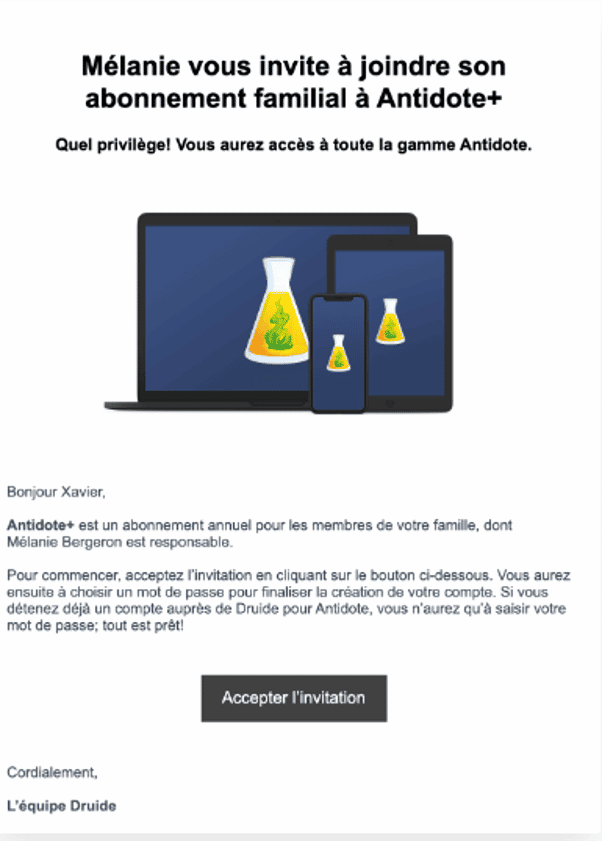
The invitation will arrive at the desired person and address. Upon acceptance, she must create a Druid account or fill in her login information.
The guest has two months to accept the invitation. As long as he/she has not given his/her approval, you can send the invitation back or cancel the invitation.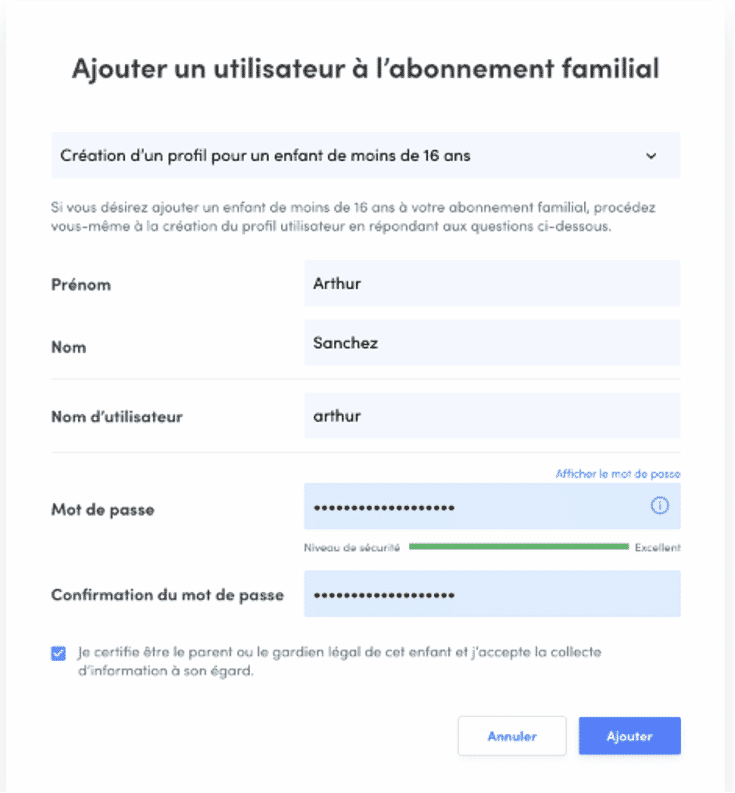
How to add a supervised user?
The following steps await you:
– Click on a circle with a + (A).
– Go to the “Create a profile for a child under 16” option.
– Fill in the form and click on “Add”.
You can provide your child with a login and password to access all three Antidote applications.
You can share Antidote on Sharesub. This site allows you to join an Antidote share and reduce the costs and fees associated with it. Its use makes you save a lot of money.
About Free Antidote
The free subscription runs for one year on the Access All Antidote (ATA) service launched on November 06, 2018. This service was replaced by Antidote+ two years later.
How Antidote works with Word
Just click on the right mouse button and the icon of the corrector. Then select “Add to Quick Access Toolbar” from the menu that opens. Repeat the operation with the dictionaries and guides icon.
The effectiveness of Antidote
This checker interacts with Word and can be very useful. Thanks to it, the synonym proposals are more adapted.
A word about Antidote
Antidote was designed by a company called Druide informatique in Quebec. The first version was released in 1996. Since then, the software has come a long way and has become an indispensable tool for writers. The Antidote HD version was born in October 2009. It is compatible with MAC OS X, Microsoft Windows and GNU/Linux operating systems.