


Fancy pressing pause on Deezer? The good news is that to cancel Deezer, a few clicks are all it takes (as long as you know where you subscribed, which is often where everything is decided). Here’s how to do it, case by case.
In short:
- You can cancel Deezer at any time, from the website or the app, via the “Manage my subscription” section.
- Cancelling Deezer is possible at any time: the Premium benefits stay active until the end of the current period, then the account goes back to Deezer Free.
- A subscription taken out via Apple, Google Play or a mobile provider is cancelled with that provider, not on Deezer.
- Cancelling doesn’t delete the account: an account with an active subscription can’t be deleted, so you first need to wait for it to return to the free plan.
- On a Family plan, cancelling moves all profiles to Deezer Free, and switching between Family and Duo means cancelling first.
- Sharing a Family or Duo plan, notably on Sharesub, is a simple way to pay less for Deezer instead of cancelling 🥳
The alternative: the Family package
Instead of cancelling your Deezer subscription completely, an interesting alternative is to switch to the Family plan. Deezer offers this plan at £19.99 a month: it lets you add up to five other people living in the same household. Choosing this plan is where Sharesub can help you save money.
Sharesub is a subscription-sharing platform that lets you share a Deezer Family plan with other users. By offering the available places on your subscription, each place earns you £3.33 a month and reduces the cost of your subscription by the same amount. If you would rather join a subscription, a Deezer Family place there costs £4.59 a month, that is £15.40 saved each month compared with the full subscription.
Why cancel your Deezer subscription?
There are several reasons why you might consider cancelling your Deezer subscription. Maybe you don’t use the platform as much as you used to and want to save money. Or perhaps you’ve found an alternative that’s better suited to your needs, with additional features that interest you more. Whatever the reason, it’s important to make an informed decision that fits your needs and your budget.
How to cancel your Deezer subscription step by step
If, despite this alternative solution, you still decide to cancel your Deezer subscription completely, here’s how to go about it:
Cancel Deezer from the website
1 Log in to your Deezer account using your login details.
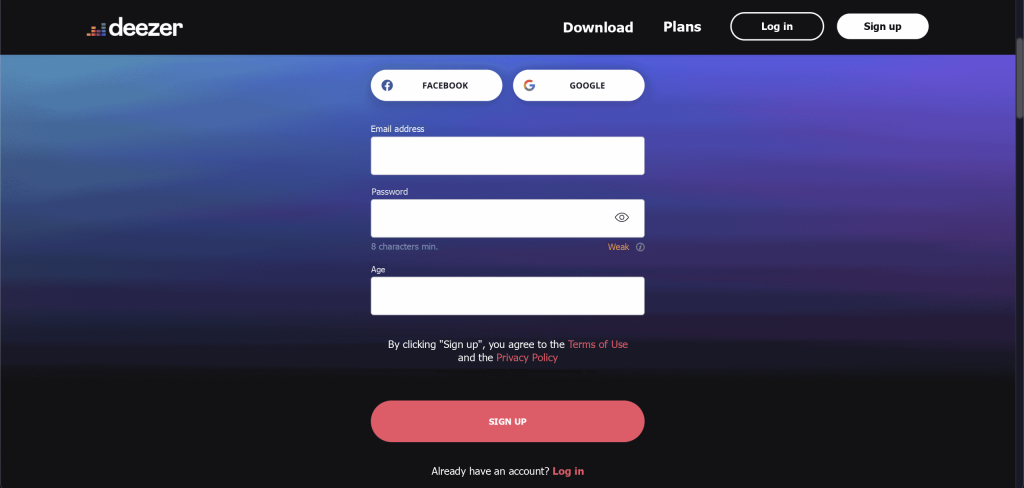
2 Access your account settings.

Look for the “Subscription” or “Billing” option in the parameters.
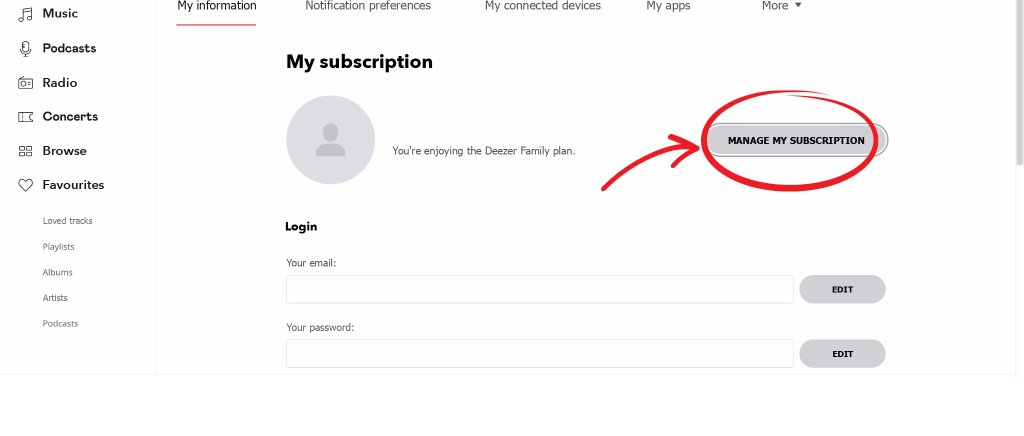
Select the option to cancel or terminate your subscription.
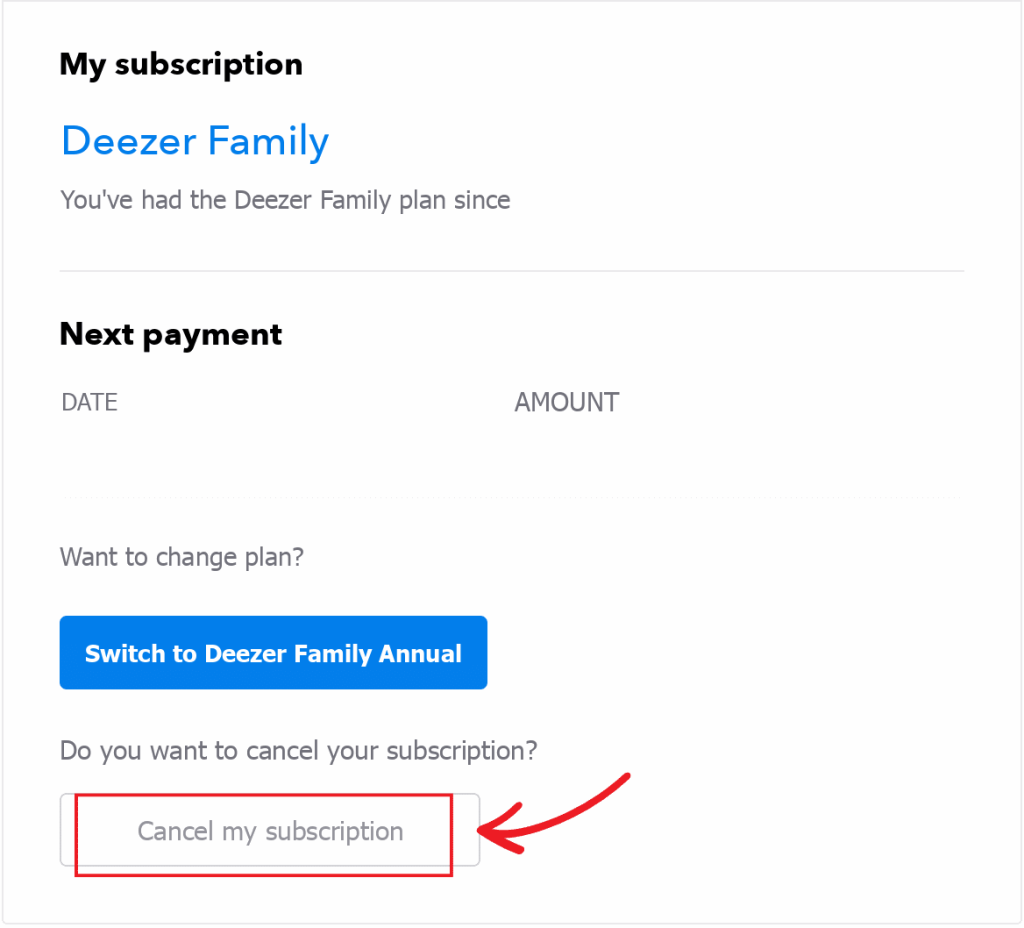
5 Follow the on-screen instructions to confirm your cancellation.
Deezer then sends you a confirmation email: keep it, as it proves the date of your request.
Cancel Deezer from the app
The path is a little different on mobile, and the labels vary slightly depending on your device:
- Tap your profile icon, at the top left.
- Open the settings, using the cog at the top right.
- In the “Subscription” section, select “Subscription management” (or “Manage my subscription”, depending on your device).
- Tap “Subscription details and invoices”.
- Select “Cancel my subscription”, choose a reason and tap “Confirm”.
What if you can’t cancel?
If the “Cancel my subscription” button can’t be found, first check where you subscribed (see the next section). If the problem persists, contact customer service from the “Contact us” section of Deezer’s website or help centre.
Cancelling Deezer depending on how you pay
You always cancel where you pay: on Deezer if you pay directly, in your Apple or Google Play subscriptions, or with your mobile or broadband provider. To put it simply: it’s like rent, you tell the landlord, not the neighbour.
| Where you subscribed | Where to cancel |
| Directly with Deezer (website or app) | On Deezer: “Manage my subscription”, then “Cancel my subscription” |
| Apple (iPhone, iPad, Mac) | Settings, your name, “Subscriptions”, Deezer, then “Cancel Subscription” |
| Google Play (Android) | Google Play, your profile, “Payments & subscriptions”, “Subscriptions”, Deezer, then “Cancel subscription” |
| A mobile or broadband provider (such as EE, Vodafone or Virgin Media) | In the provider’s customer account, on the Deezer option |
On a Mac, open the App Store, click your name, then “Account Settings” and “Subscriptions” to manage your Deezer subscription.
Good to know : if Deezer doesn’t show a “Cancel my subscription” button, it’s often because the subscription is managed by Apple, Google or a mobile provider. Cancelling on Deezer isn’t enough in that case: billing continues until the cancellation is made with the provider, who may also take a little time to process it.
What happens after you cancel Deezer?
After you cancel Deezer, you keep your Premium benefits until the end of the current period, then the account automatically goes back to Deezer Free. So you don’t lose the month you’ve already paid for.
So what does that look like in practice?
- Your account is kept, with your playlists and your favourites.
- The ads come back, and you can no longer listen offline, skip tracks as much as you like or listen ad-free.
- Your downloads are no longer accessible, even though your playlists remain available online.
- No payment follows the end of the paid period.
The free version is still usable: you can listen to tracks, recommended playlists, podcasts or the radio, with ad breaks.
Good to know: cancelling Deezer Premium deletes neither your account nor your playlists. Only the paid benefits disappear at the end of the current period, and you can resubscribe whenever you like.
When does cancelling Deezer take effect, and do you need to give notice?
Cancelling Deezer takes effect at the end of the current subscription period: you keep Premium until that date, with no further payment afterwards.
Notice and renewal date
Deezer’s official help says you can cancel at any time and doesn’t mention a notice period. Some guides do mention a delay of around 48 hours before the renewal date. To be on the safe side, cancel a few days before the next payment date shown in your account.
Here’s an example: for a subscription that renews on the 20th of each month, cancelling on the 16th does stop it on the 20th. Cancelling on the 19th could cost you an extra month (and that would be a shame).
Refunds and right of withdrawal
As a rule, Deezer doesn’t refund pro rata: the subscription remains valid until its end date, especially when billing goes through Apple or Google. According to the terms of the Premium offer as relayed by comparison sites, the right of withdrawal doesn’t apply to the subscription, so check the terms of your plan before subscribing.
If something looks wrong (double billing, a payment after cancelling), first contact the platform that bills you (Apple, Google, your mobile or broadband provider), or Deezer if you pay directly.
Deezer Family or Duo: cancel, leave or change plan?
Only the administrator can cancel a Family or Duo plan, and cancelling it moves all profiles back to Deezer Free. A regular member has to ask the administrator to remove them.
You are the subscription administrator
You cancel with the same steps as for a Premium subscription. The difference is the effect on everyone else: all profiles are suspended and move to Deezer Free. So warn the members before you click (yes, everyone loses Premium at once).
To change plan, for example from Family to Premium or to Duo, Deezer asks you to cancel the current subscription first. If you subscribed via Apple, the new subscription only takes effect after the old one expires: it’s best to cancel, wait, then subscribe. Our guide to changing your Deezer subscription walks you through the steps!
You are a regular member
The real question is: do you want to leave, or have the subscription stopped? As a member, you can’t cancel the plan. The administrator has to remove you, or convert your profile into a standalone account before taking it off the subscription.
You then go back to Deezer Free and keep your music, but you lose the Premium benefits until you take out your own plan or join another shared subscription.
How to delete your Deezer account after cancelling
Cancelling stops the payments, but doesn’t close the account: to delete it, you first need to wait for the subscription to end and for the account to go back to Deezer Free. An account with an active subscription can’t be deleted.
Once the account is back on the free plan:
- Open your account settings, on the website or in the app.
- Scroll to the bottom and select “Delete my account”.
- Enter your Deezer password (or follow the link sent to you by email) and confirm.
Good to know: deleting a Deezer account is permanent. Your data, your settings, your favourites and your playlists are erased, and the subscription effectively ends. Export your playlists before you confirm if you want to find them elsewhere.
Deezer is still charging me after I cancelled: what can I do?
First check Deezer’s confirmation email and the end-of-period date it shows: a payment can land just before the subscription actually ends. It’s the quickest way to find out whether your cancellation was recorded.
Next, work out who is billing you. If you subscribed via Apple, Google Play or a mobile provider, that provider may not have finished processing the cancellation, and that’s where you need to confirm it or redo it.
If you pay Deezer directly and the payments continue despite a confirmed cancellation, contact customer service from the “Contact us” section, including the date and amount of the charge, as well as the confirmation email.
Key takeaways on cancelling your Deezer subscription
In conclusion, cancelling your Deezer subscription completely is not the only option when you want to save money. By choosing the Family plan and sharing the available places on your subscription on sharesub.com, you can considerably reduce what you pay while still enjoying the music you love.
FAQ: cancelling Deezer
Open your account settings, then “Manage my subscription” and “Cancel my subscription”, choose a reason and confirm. If you subscribed via Apple, Google Play or a mobile provider, you cancel with them.
Yes, as long as you subscribed directly with Deezer. Go through your profile icon, the settings, then subscription management and “Cancel my subscription”.
At the end of the current subscription period. You keep Premium until that date, then the account goes back to Deezer Free.
They are kept, along with your account and your favourites. Only the paid benefits disappear, including offline listening and ad-free listening.
No. Cancelling stops the payments and moves the account back to the free plan. To delete it, you need to wait for the subscription to end, then choose “Delete my account” in the settings.
As a member, you can’t cancel the plan: the administrator has to remove you from the subscription. You then go back to Deezer Free.
By sharing a Family or Duo plan with other users. On Sharesub, a Deezer Family place costs £4.59 a month!
Official sources
The cancellation procedure, account deletion and Family plan rules are based on Deezer’s official pages, consulted in november 2026: